Feature guide
12 steps from open to profitable.
KairosPicks has a lot of firepower. Here's exactly how to use every tool.
Dashboard feature
Live Line Intelligence
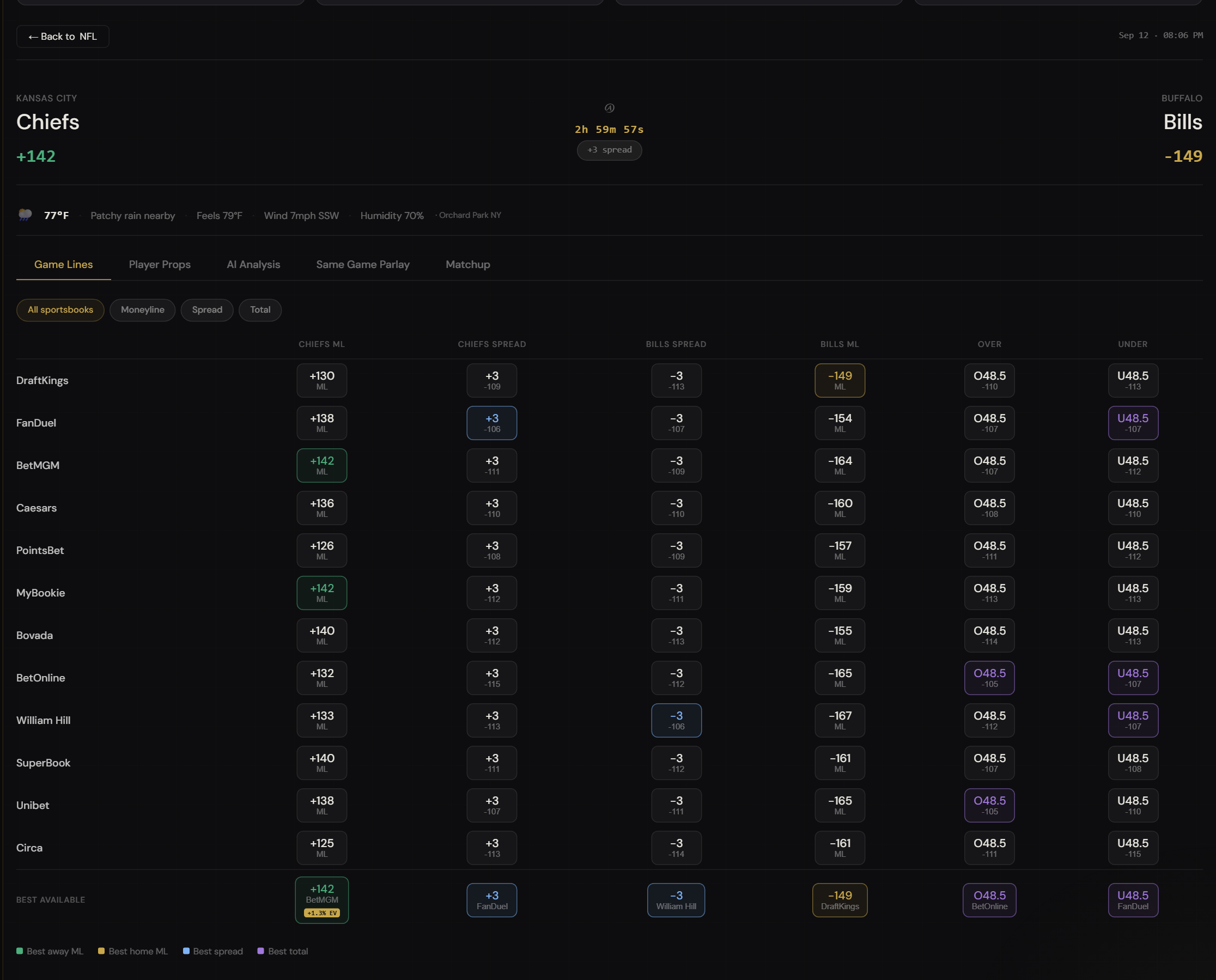
Live Line Intelligence is the core of KairosPicks. It pulls real-time lines from 12 major sportsbooks — DraftKings, FanDuel, BetMGM, Caesars, PointsBet, and more — and displays them side by side so you can spot the best available number in seconds. Sharp users get all 12 books. Watcher users get a limited set.
How to use it
- Select your sport using the tab row at the top — NFL, NBA, MLB, College Football, or College Basketball. The game list refreshes automatically.
- Switch between Moneyline, Spread, and Total using the market toggle. Each game card shows the best available line highlighted in gold.
- Click any game card to select it. The right panel loads news, AI analysis options, and the Best Line Finder for that matchup.
- Use the search bar to filter games by team name when you know exactly what you're looking for.
- Check the refresh timer in the top bar to see when odds last updated. Lines move fast — especially close to game time.
The highlighted odds cell is the best available line across all tracked books. Even a half-point difference on a spread bet can flip a losing week into a winning one. Habit-build checking KairosPicks before every bet.
My Account feature — do this before anything else
AI Settings
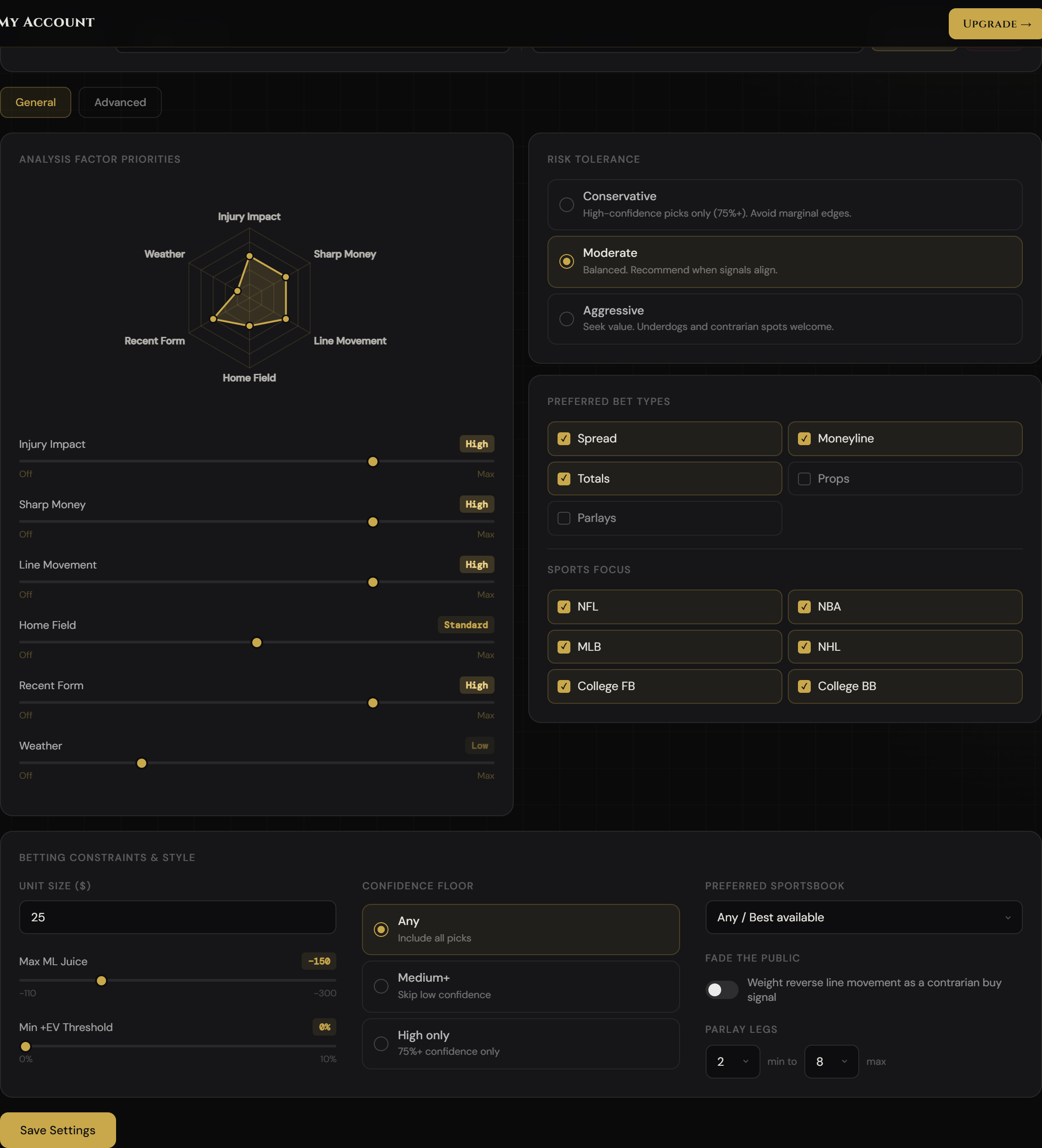
Every AI feature on KairosPicks — The Kairos Read, Edge Picks, and your Edge Profile analysis — reads your AI Settings before generating output. These settings tell the AI what to weight most heavily, what bet types to focus on, and how aggressively to look for value. Configure them once and every AI analysis is personalized to you automatically.
How to configure it
- Go to My Account → AI Settings tab. You'll see two sections: Analysis Factor Priorities and Betting Constraints & Style.
- Set your Analysis Factor sliders. Each slider (Injury Impact, Sharp Money, Line Movement, Home Field, Recent Form, Weather) runs from Skip to Critical. Drag them to reflect how much you want each factor emphasized in every AI pick.
- Choose your Risk Tolerance. Conservative limits the AI to high-confidence picks (75%+). Moderate is balanced. Aggressive tells the AI to surface underdogs and contrarian spots.
- Select your preferred bet types and sports focus. If you never bet parlays, uncheck Parlays. If you only care about NBA and NFL, uncheck the rest — the AI will filter accordingly.
- Fill in your Betting Constraints. Set your unit size so stake recommendations scale to your bankroll. Set your max ML juice so the AI never recommends heavy favorites beyond your threshold. Set a minimum +EV threshold to filter out marginal edges. Toggle "Fade the public" if you're a contrarian bettor — the AI will weight reverse line movement as a buy signal.
- Set your parlay leg range. Choose a minimum and maximum number of legs — the AI will only suggest parlays within that window.
- Click Save Settings. The preview box at the bottom shows exactly what the AI will be told on every request. Changes take effect on the next AI analysis you run.
The "Current Settings Preview" box is the literal text injected into every AI prompt. If a setting doesn't appear there, it's not reaching the AI. Always hit Save and confirm the preview updated before running an analysis.
AI feature
The Kairos Read
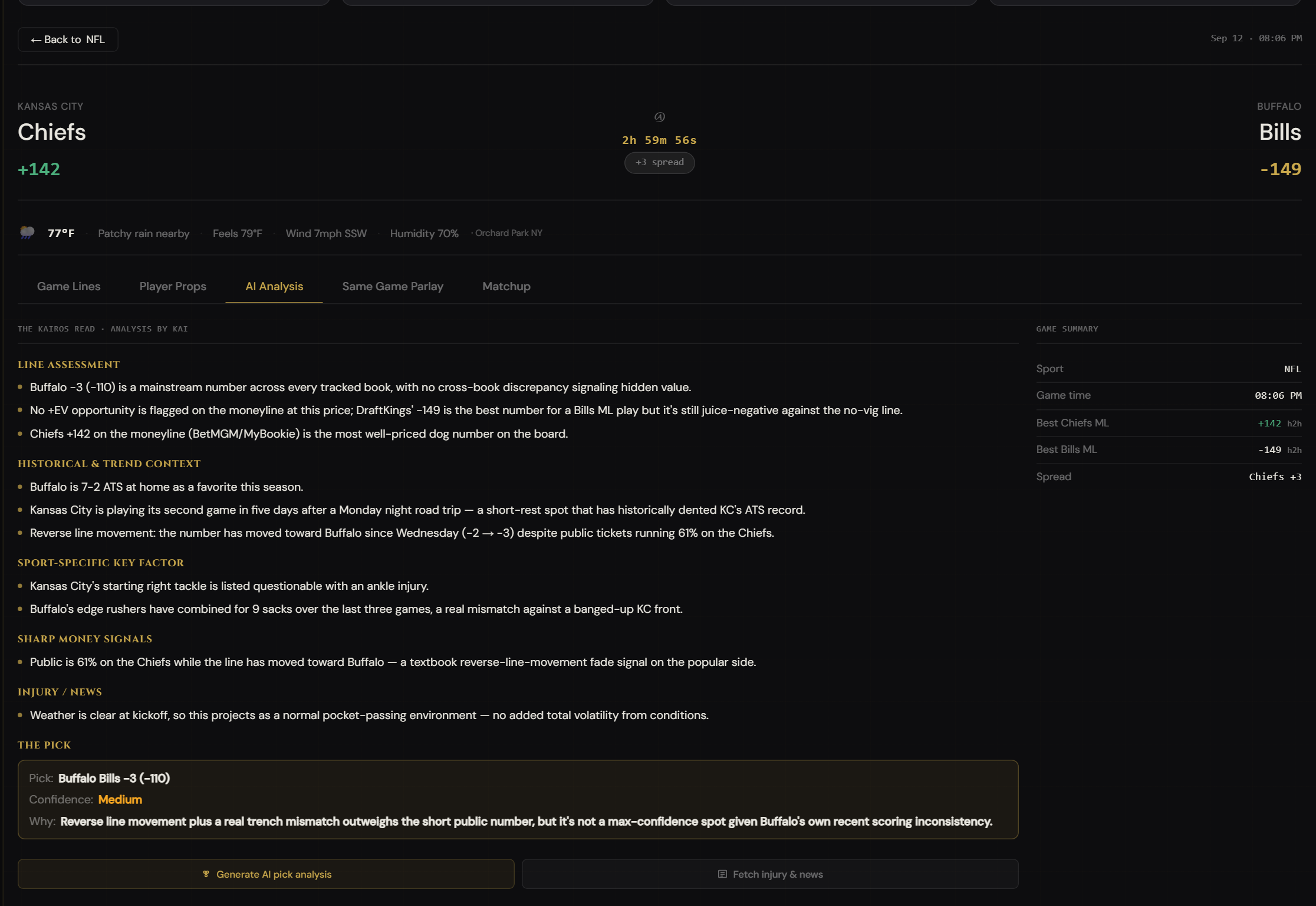
Every game on the dashboard can be run through Claude AI (claude-sonnet-4-6) for a full pick breakdown. The Kairos Read doesn't just regurgitate the line — it pulls real-time context on injuries, recent form, line movement, and sharp money signals, then delivers a structured analysis with a clear pick, reasoning, and confidence level.
How to use it
- Click a game card in the Live Line Intelligence panel to select it. The right panel will load for that matchup.
- Click "Analyze with Kairos" in the right panel. The AI will run a real-time search and generate its analysis — this takes 10–30 seconds.
- Read the output carefully. It includes: the recommended pick, the odds to target, the core reasoning (injury context, sharp signals, line value), and a confidence level that reflects the AI's certainty.
- Cross-reference with line pressure data (Step 6). If the AI and the sharp money agree, that's a strong signal.
- Watcher and Sharp users see a blurred preview of the analysis. Enter your email to verify an Oracle subscription and unlock the full output.
The Kairos Read gives you a confidence level for a reason. High-confidence picks warrant a larger stake under the Confidence Units strategy. Don't bet every game the same size — size your bets to match what the data actually says.
Daily free pick
Signal of the Day
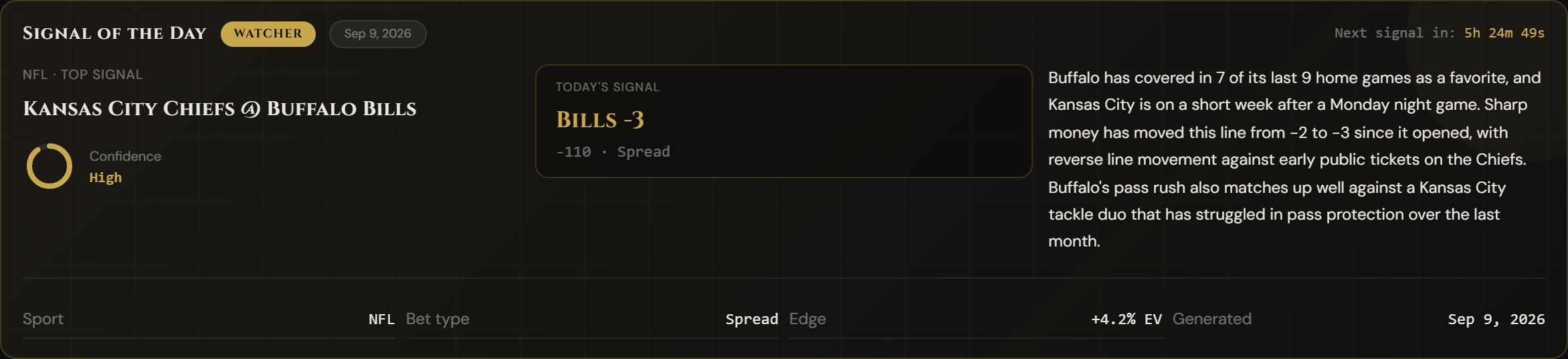
Every day, KairosPicks generates a free AI pick for all users — including those on the Watcher tier. The Signal of the Day is generated fresh each morning, cached so it's fast to load, and displayed prominently at the top of the dashboard. It's the starting point for any bettor who opens the app.
How to use it
- Open the dashboard. The Signal of the Day card loads automatically at the top, above the game list.
- Read the game, the pick, and the odds. The card shows the matchup, the recommended side, the target odds, and a short confidence bar.
- Use the carousel arrows to scroll through multiple picks — the card supports several daily selections. Watcher users see the first pick; Sharp users unlock additional picks in the carousel.
- Check the countdown timer on the card to see when today's picks expire and tomorrow's are generated.
- Click "Win" or "Loss" after the game to log the result and track the pick's historical accuracy over time.
Even on the Watcher tier, the Signal of the Day is a legitimate AI analysis — not a marketing teaser. Track it for a week before going Sharp to see how the AI performs on matchups you already know.
Dashboard feature
Prop Intelligence
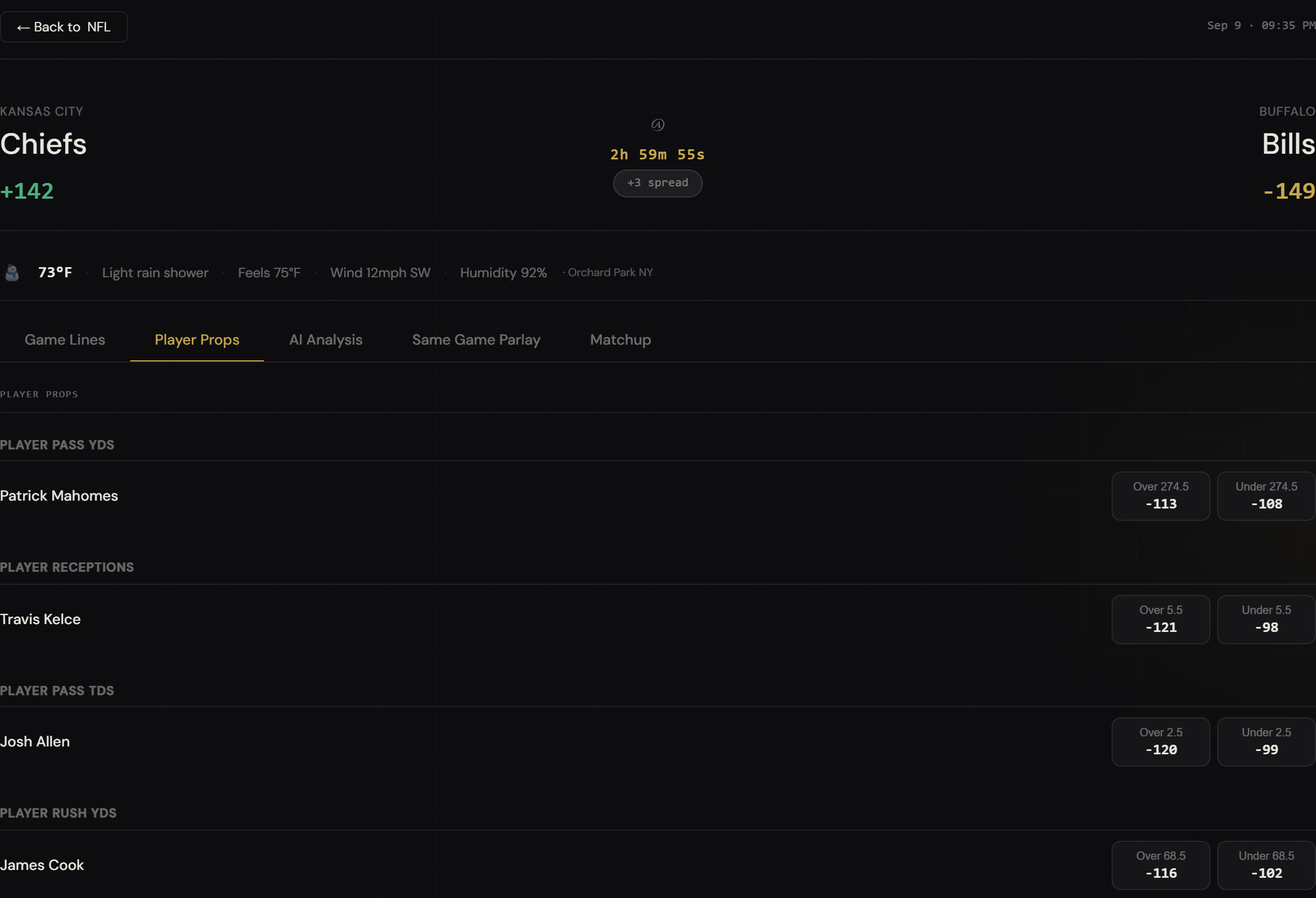
Props are where sharp bettors find the most consistent edges. The market is less efficient than sides and totals because books can't pay as much attention to every player prop. KairosPicks surfaces player prop markets from multiple books, lets you filter by sport and player, and lets you run AI analysis on any individual prop.
How to use it
- Click the "Props" tab in the dashboard's main navigation tabs, just below the header.
- Filter by sport using the sport selector to narrow props to the league you're targeting today.
- Browse player props in the list — each row shows the player name, the market (points, yards, strikeouts, etc.), and the Over/Under line with odds from multiple books.
- Click a prop to select it. Use the "Analyze with Kairos" button to get a prop-specific breakdown — the AI will factor in recent usage, matchup data, and injury reports.
- Look for disagreement between books. When DraftKings has a player at Over 24.5 points and FanDuel has them at Over 22.5 with the same price, one book is wrong — and that's your edge.
Player props are most valuable within 2–4 hours of game time when injury statuses are final. KairosPicks AI incorporates the latest available news — run your prop analysis close to tip-off or kickoff for the most accurate read.
Dashboard feature
Parlay Constructor
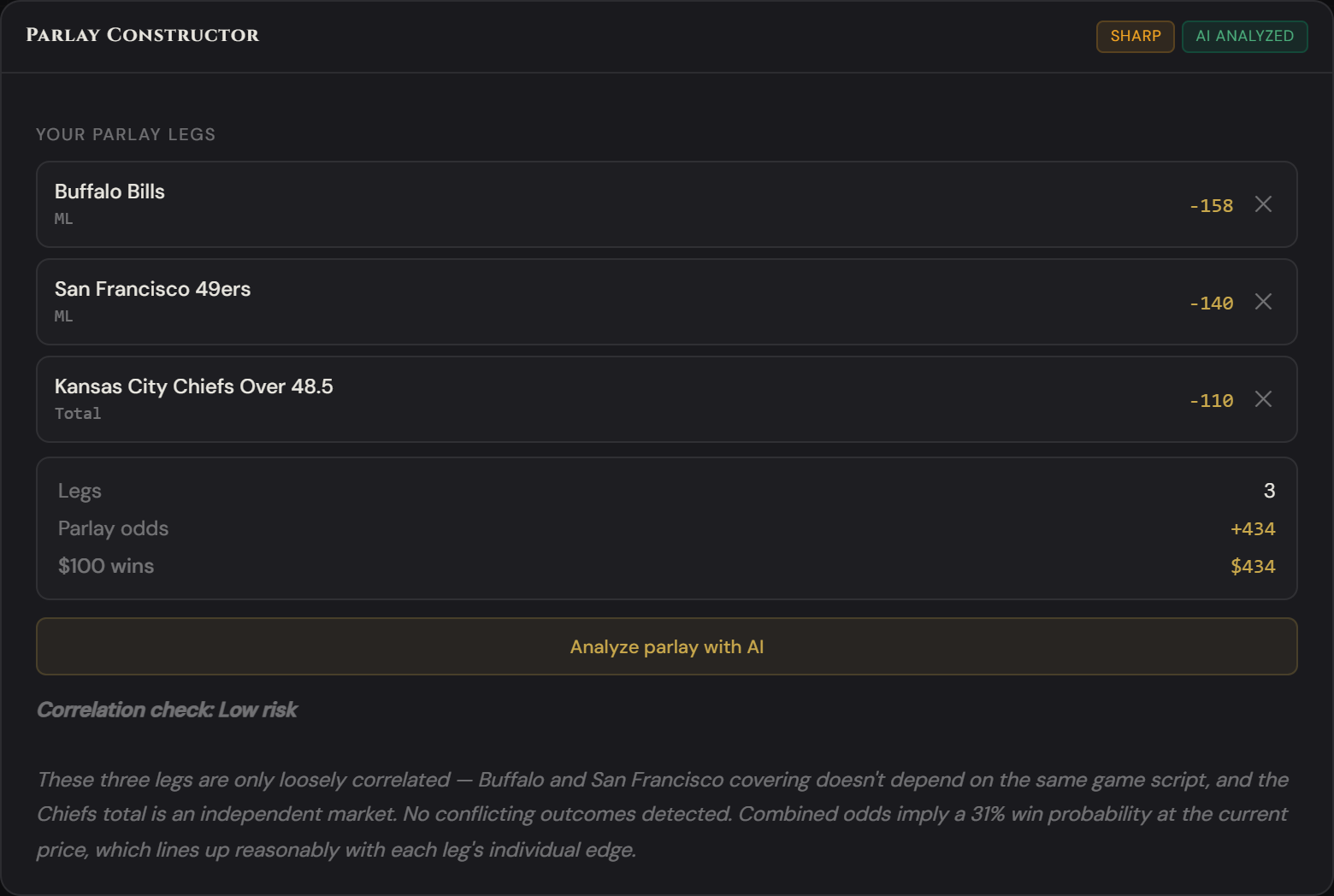
The Parlay Constructor lets you build multi-leg parlays and then run them through AI correlation analysis. Not all parlay combinations are created equal — some legs move together (correlated) and some cancel each other out. The AI tells you which combinations are smart and which are traps.
How to use it
- Open the "Parlay" tab in the dashboard's main tab row. The constructor panel appears on the right.
- Click any odds cell on a game card to add that leg to your parlay. The leg appears in the constructor with the team, market, and odds.
- Add 2–6 legs. The parlay total odds and projected payout update automatically as you add legs.
- Click "Analyze Parlay with Kairos" to get a risk and correlation assessment. The AI will flag legs that conflict or correlate, and give an overall recommendation.
- Remove any leg by clicking the X next to it in the constructor panel. Use the AI output to decide which legs to keep.
A good rule of thumb: 2-leg same-game parlays on correlated outcomes are better risk-adjusted than 5-team cross-sport parlays. The AI will explain exactly why — and give you a confidence rating on the combined legs. Pay attention to that rating.
Dashboard feature
Line Pressure Tracker & Sharp Signal Tracker
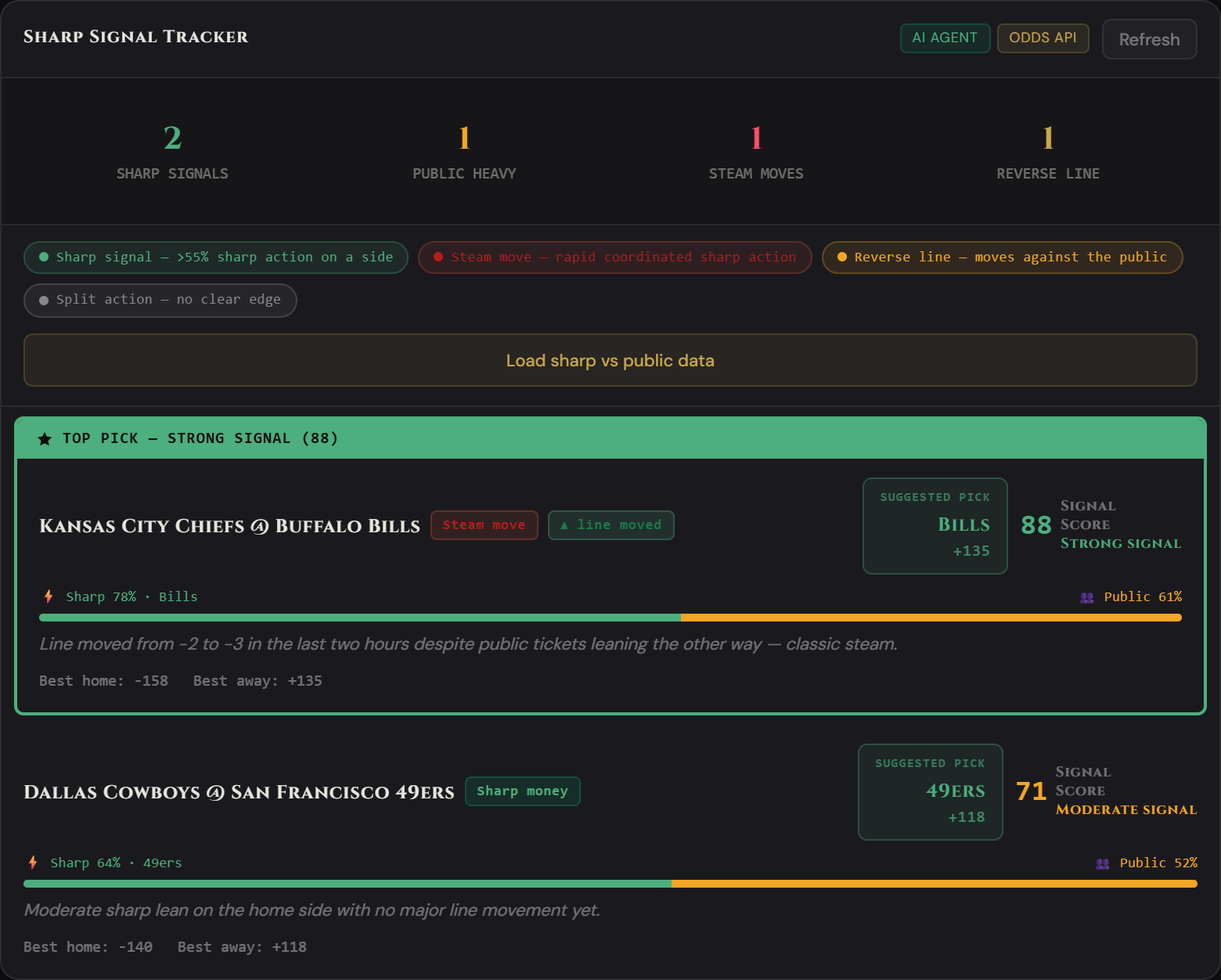
Line movement is the market's signal. When the line moves, money is talking. KairosPicks tracks how lines shift across books and surfaces sharp vs. public betting percentages so you can see exactly who is moving the number — and which direction the smart money is pointing.
How to use it
- Click the "Sharp Signal" tab in the main dashboard nav. The Sharp vs. Public panel lists today's games with signal data for each.
- Read the bar graphic on each game — it shows the split between sharp (professional) money and public betting percentages.
- Look for steam moves — these are labeled with a "STEAM" badge and indicate rapid, coordinated line movement from sharp bettors. Steam moves are the strongest signal on the board.
- Cross-reference with the game card. If sharp money is hitting one side and the line has moved against the public, that's a classic fade-the-public setup.
- Check game cards for the movement pill — an arrow indicator shows the direction of recent line movement on each individual game.
Steam moves are rare and high-value. When you see one, that's not noise — that's coordinated sharp action hitting multiple books simultaneously. Treat a steam move as your strongest buy signal and time your bet immediately before the line adjusts further.
My Account feature
Wager Log
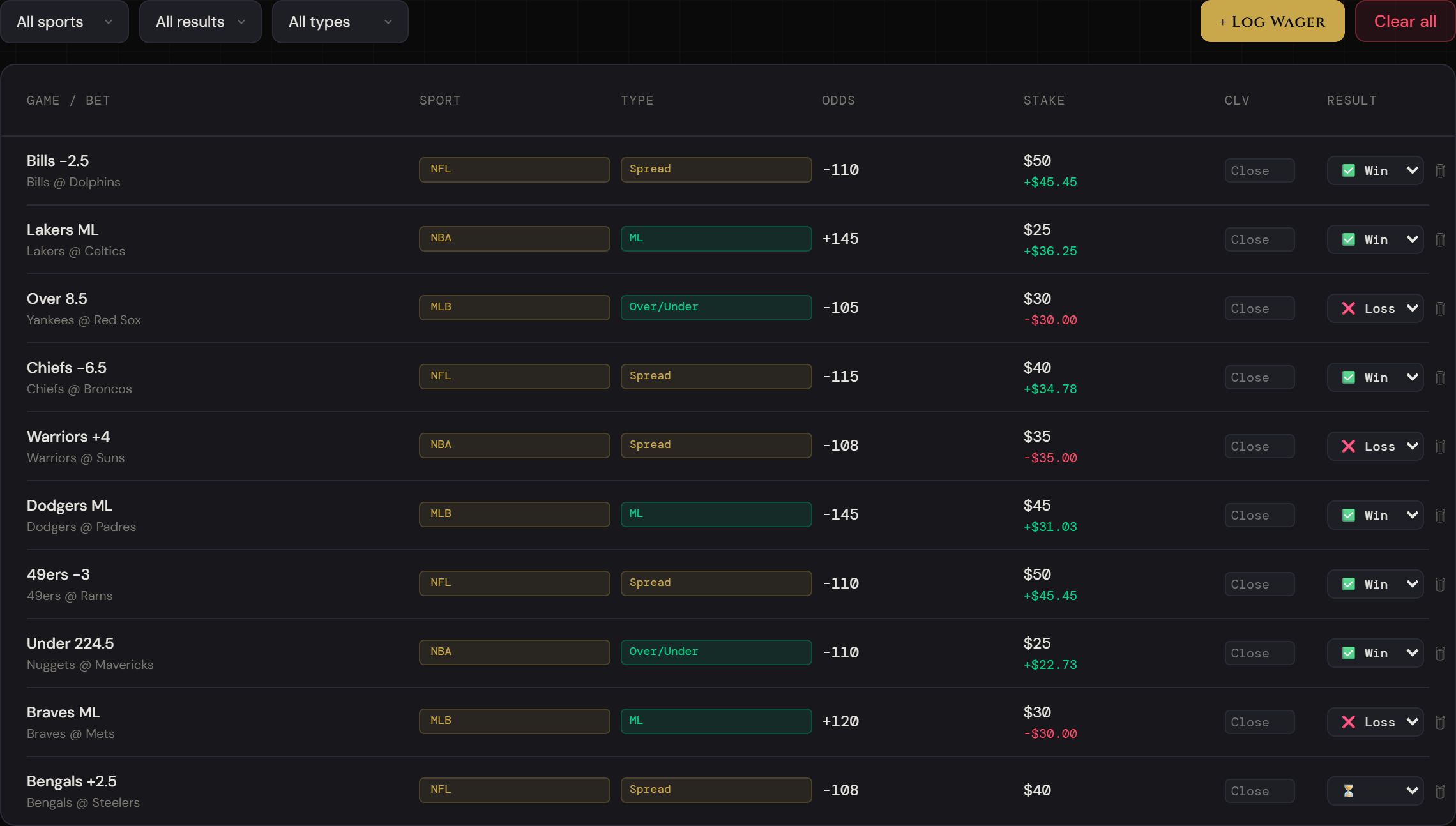
You cannot improve what you don't measure. The Wager Log in My Account gives you a permanent record of every bet you make — the game, bet type, odds, stake, and result. All data is stored locally in your browser, so it persists between sessions without requiring an account login.
How to use it
- Go to My Account → Wager Log tab. Click "Log Wager" to open the entry form.
- Fill in the details: sport, bet type (Moneyline, Spread, Over/Under, Prop, Parlay), the game description, your pick, the odds you got, your stake, the sportsbook, and any notes.
- Set the result to Pending if the game hasn't started yet. Come back after the game and update it to Win, Loss, or Push.
- Filter your wager history using the dropdowns at the top of the log — filter by sport, result, or bet type to slice the data any way you want.
- Watch the stats row at the top of the Overview tab update automatically — total wagers, wins, losses, win rate, and total profit/loss all recalculate in real time.
Log every wager, including the ones you want to forget. Selective logging creates a false picture of your results and ruins the edge analysis. The only way the AI coaching works is if the data is honest.
My Account feature
Edge Profile
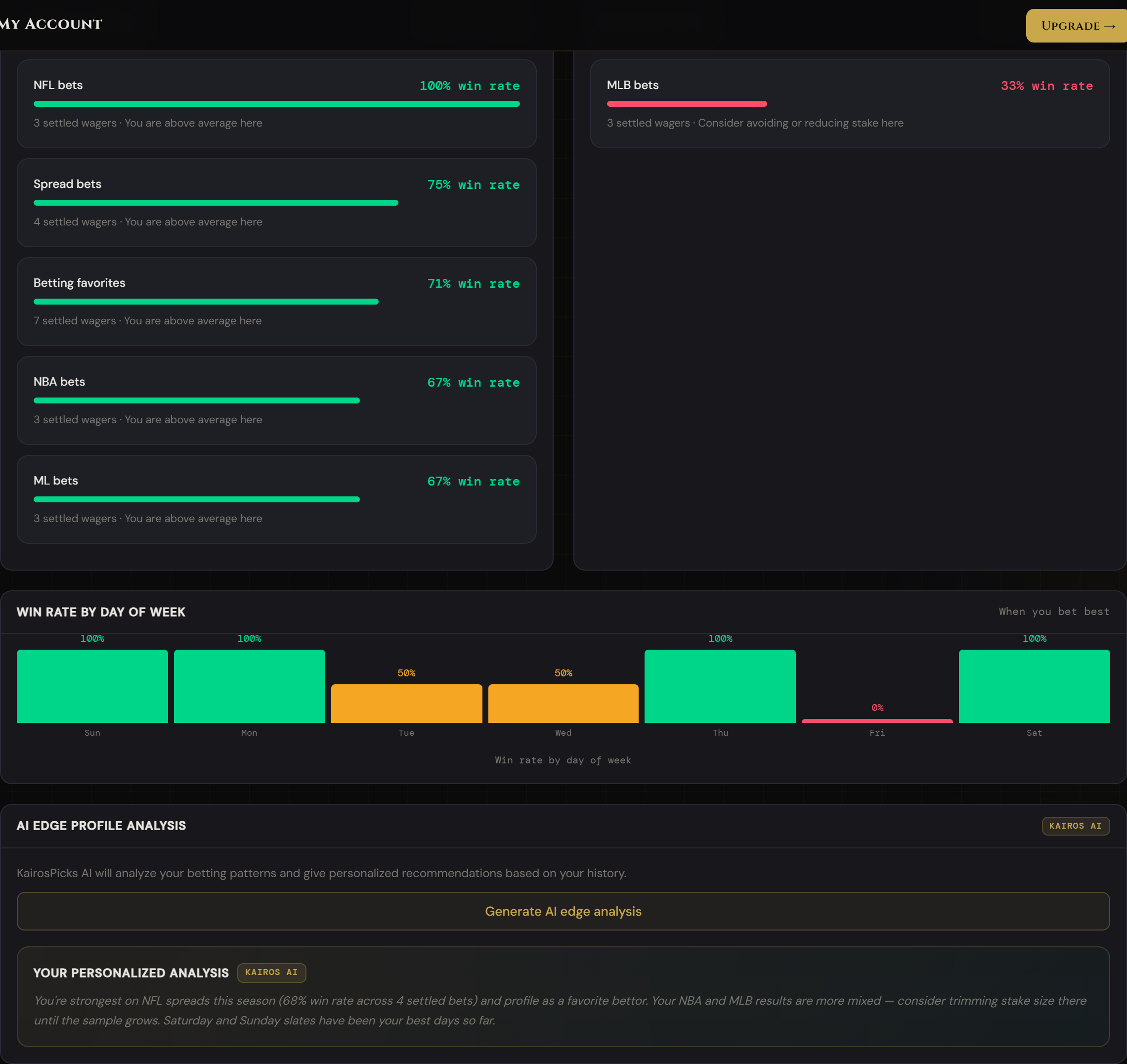
Most bettors have blind spots — sports, bet types, or days of the week where they consistently underperform. The Edge Profile tab surfaces those patterns automatically and shows you exactly where your edge is and where your money is leaking. Then the AI synthesizes it into actionable advice.
How to use it
- Navigate to My Account → Edge Profile tab. You need at least 5 settled wagers for any data to appear.
- Review "Your Hot Streaks" — the card shows which sport, bet type, and market combinations you win most frequently. These are your edges. Bet more here.
- Review "Your Cold Spots" — the card shows where you're losing money. This is where you need to either stop betting or change your approach entirely.
- Check the Day-of-Week chart. Many bettors perform very differently on weekday vs. weekend games. The bar chart shows your win rate by day so you can schedule your bets around when you actually do your best work.
- Click "Generate AI edge analysis" to get KairosPicks AI's interpretation of your patterns — what it means, what to do about it, and specific recommendations based on your actual history.
If the Day-of-Week chart shows you're 55%+ on Saturdays and under 40% on Thursdays, that's a real pattern worth acting on. Reduce stake sizes on Thursday slates and increase them on Saturdays until the data tells you otherwise.
My Account feature
Capital Manager + Staking Calculator
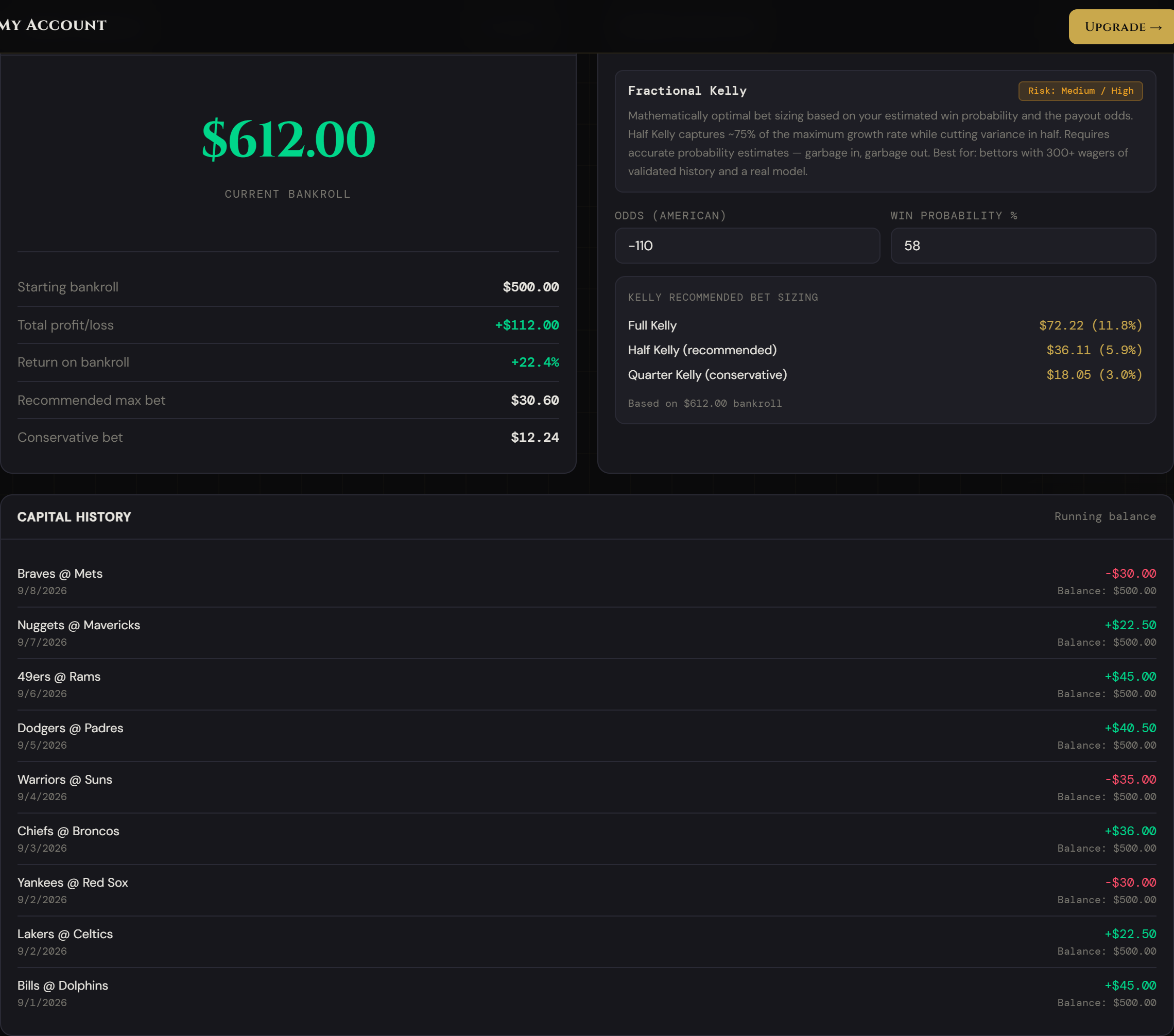
The Capital Manager tracks your total balance and auto-updates it as you log wager results. The Staking Calculator is the most powerful tool for protecting your bankroll long-term — it tells you exactly how much to bet on any given pick based on four different professional staking strategies. This is the feature that separates disciplined bettors from gamblers.
How to use it
- Go to My Account → Capital Manager tab. Click "Set bankroll" and enter your starting balance. This is your reference point for all calculations.
- Select a staking strategy from the dropdown: Flat Betting, Confidence Units, Fractional Kelly, or Martingale. The calculator panel changes to match.
- Enter the inputs for your chosen strategy (odds, win probability, stake percentage, etc.) and the calculator outputs your recommended bet size instantly.
- Check your capital history in the card below — it shows your running balance over time as wagers are logged and settled.
The four staking strategies
-
Flat Betting — Bet the same dollar amount or percentage of bankroll on every single play. The simplest and most disciplined approach. Enter your bankroll and unit size (1–2% is standard), and the calculator shows you your flat bet, conservative range, and maximum per-bet cap. Best for: new bettors, anyone building discipline. Risk: Low.
-
Confidence Units — Size bets based on how confident you are. A standard play is 1 unit. An above-average play with clear line value is 2 units. A high-conviction play where multiple signals align is 3 units. Enter your base unit size and select your confidence tier. Best for: experienced bettors with a consistent edge identification process. Risk: Medium.
-
Fractional Kelly — The Kelly Criterion is the mathematically optimal bet sizing formula based on your edge. KairosPicks uses fractional Kelly (half or quarter Kelly) to reduce variance while staying mathematically sound. Enter the American odds and your estimated win probability, and the calculator outputs Full, Half, and Quarter Kelly sizes against your bankroll. Best for: data-driven bettors who can estimate win probabilities accurately. Risk: Medium.
-
Martingale — This calculator is included for educational purposes only — not for real betting. Martingale doubles your bet after each loss. The calculator shows how fast the required bet escalates through a losing streak, making clear why professionals never use it. Risk: Very High.
Start with Flat Betting until you have 50+ logged wagers. Once you have enough data to estimate your win probability by bet type, switch to Fractional Kelly for mathematically optimized sizing. The Edge Profile tab tells you exactly what your win rate is by market — that's your Kelly input.
My Account feature
Edge Picks
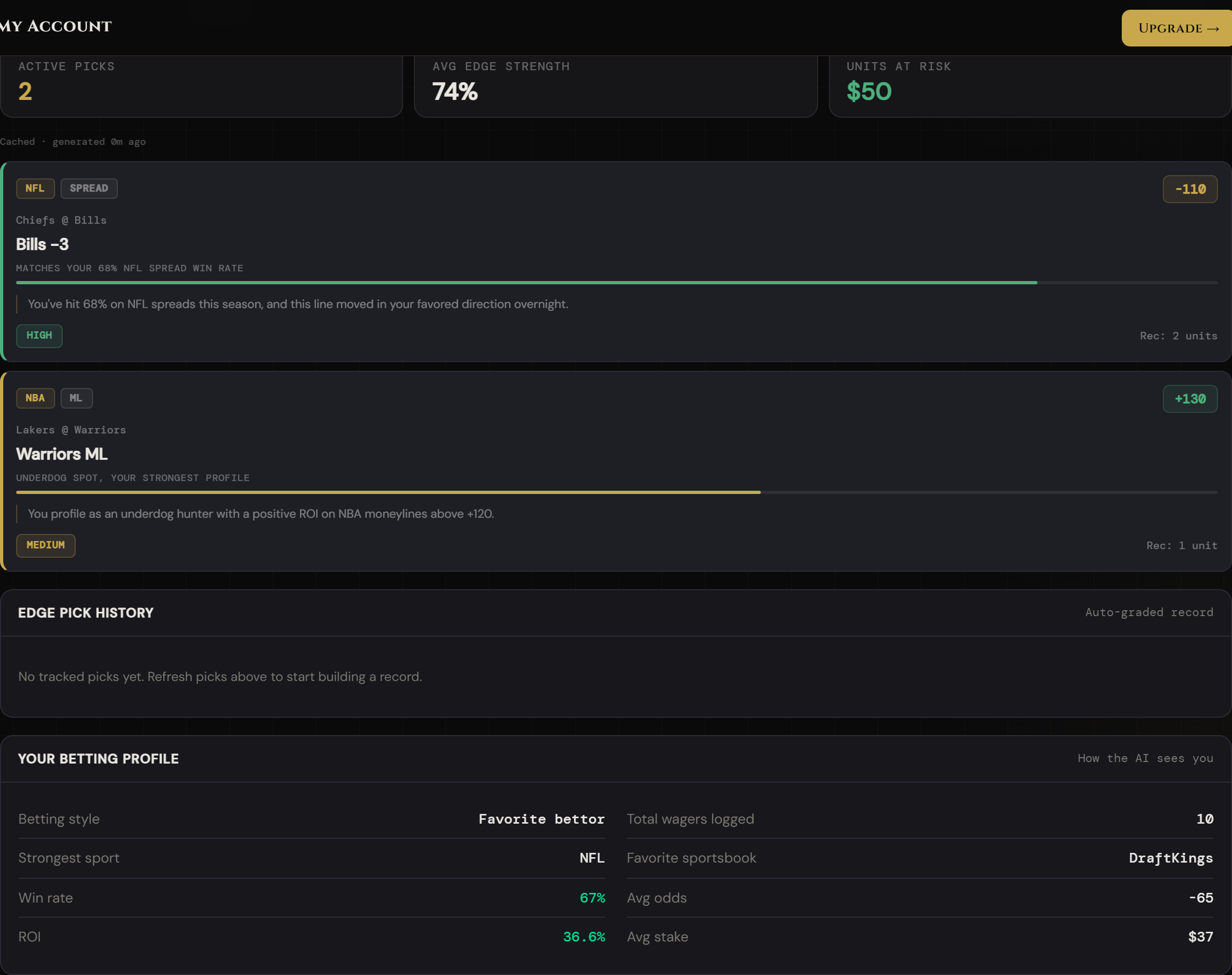
Once you have a wager history, KairosPicks can generate picks that are specifically calibrated to your strengths. The AI reads your logged wagers, identifies your highest win-rate markets, and then matches those profiles to today's live games — recommending specific picks that play to your demonstrated edge.
How to use it
- Go to My Account → Edge Picks tab. You'll need at least a handful of logged wagers for the recommendations to be meaningful.
- Click "Generate personalized edge picks". KairosPicks AI reads your full wager history, identifies your strongest patterns, and generates a set of picks filtered to today's live odds that match your tendencies.
- Review each recommendation card. Each card shows the sport, the pick description, a confidence level, and the reasoning — always tied back to your personal data.
- Check your betting profile in the card below the recommendations. This shows how the AI categorizes you as a bettor — your strongest sports, bet types, and overall profile description.
- Regenerate picks at any point — the AI will pull the latest logged wagers and re-run the analysis. The more wagers you've logged, the sharper the recommendations get.
Edge Picks are not generic AI analysis — they're filtered by your own historical edge. If you're consistently winning NBA Moneylines but losing on spreads, the AI stops recommending spread bets for you entirely. That's a feature, not a limitation.
Content feature
The Signal
Every morning at 7am, KairosPicks automatically publishes a fresh AI-written sports betting post. The Signal covers NFL, NBA, MLB, and college sports with injury context, line movement analysis, and a clear pick recommendation per post. It's fully free — no subscription required to read.
How to use it
- Visit The Signal directly or click "The Signal" in the header navigation. Today's post loads at the top.
- Use the filter tabs (NFL, NBA, MLB, College, Strategy) to find posts relevant to what you're betting today.
- Read the pick recommendation in the highlighted box inside each post — it includes the pick, the odds to target, and the confidence level.
- Use posts for context, not as your only source. Posts are a starting point. Cross-reference the pick against the live dashboard before pulling the trigger.
- The Signal is also how many bettors find KairosPicks. If you found this guide through a search for "AI sports picks" or "NFL parlay analyzer," The Signal is why. Share posts to help others find the platform.
Read the morning signal with your coffee, before the lines move. KairosPicks AI incorporates overnight injury news and early sharp action — posts published at 7am often reference edges that close by noon as the books adjust.